Lilliput Steps: A Pixel Font with Modern Appeal
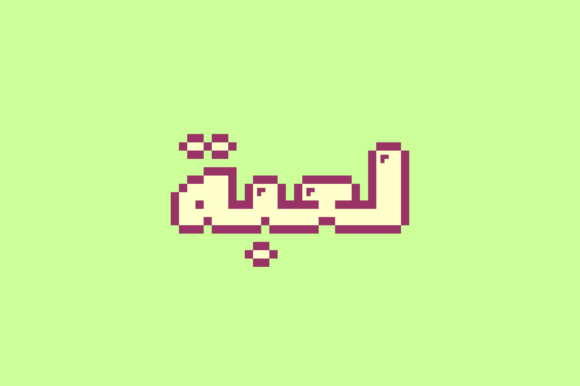
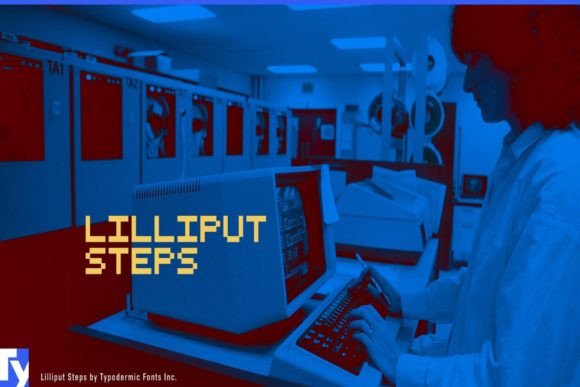
There's a particular kind of charm that comes from the early days of video games—the blocky characters, the bright, limited color palettes, the worlds that felt enormous despite their simplicity. For designers and creatives who grew up in that era, or who simply appreciate that aesthetic, typography can be a direct line to that feeling. Lilliput Steps is a display font that taps into this nostalgia while presenting a surprisingly versatile and contemporary face. It's a pixeled typeface inspired by the iconic style of the Earthbound series, but its application extends far beyond retro game tributes.
A Font with Personality and Purpose
What makes a font like Lilliput Steps stand out in a sea of sans serifs and serifs is its distinct character. Each letter is constructed from a clear pixel grid, giving it a digital, crafted quality that feels both playful and intentional. This isn't a jagged, hard-to-read bitmap font from the 1980s; it's a carefully designed typeface with a modern appearance. The characters are balanced, with consistent spacing and a quirky, friendly demeanor. This makes it an excellent choice for projects that need to convey creativity, approachability, and a touch of whimsy without sacrificing professionalism.
Think of it as a creative font that bridges two worlds. It carries the warmth of handcrafted pixel art but delivers it in a clean, scalable format suitable for today's design needs. Whether you're designing a logo for an indie game studio, creating packaging for a craft soda, or building social media graphics for a retro-themed café, this typeface brings a specific, ownable vibe to the table.
Practical Applications for Your Creative Projects
The true test of any design asset is how it performs in the real world. Lilliput Steps shines in applications where personality and visual impact are key. Its bold, blocky forms make it highly legible at larger sizes, perfect for headlines and branding elements.
- Branding & Logo Design: A logo sets the tone for an entire brand. Using Lilliput Steps for a wordmark or a logo lockup can instantly communicate a brand identity that is fun, tech-savvy, or nostalgic. It works beautifully for businesses in the gaming, tech, food and beverage, or creative services industries.
- Packaging Design: On a shelf, packaging needs to grab attention. The unique texture of a pixel display font can make a product stand out. Imagine it on a bag of artisan coffee, a box of retro candy, or the label for a craft beer. It adds character and story.
- Editorial & Web Design: While not for body text, it's a standout choice for blog post titles, chapter headings in a digital magazine, or feature callouts on a website. It adds a layer of visual interest that breaks up monotony.
- Marketing & Social Media: In the fast-scrolling world of social media, a distinctive font can stop a thumb. Use it for quotes, promotional graphics, video titles, or Instagram story headers to create a consistent and recognizable look for your content.
- Merchandise & Invitations: For T-shirts, stickers, posters, or party invitations, Lilliput Steps offers a ready-made aesthetic. It’s ideal for any print material where you want the typography itself to be a key part of the design's appeal.
Integrating a Pixel Font into Your Design Workflow
Adopting a specialized typeface like this requires a bit of thoughtful implementation. The goal is to leverage its strengths without overwhelming a design. First, consider font pairing. A highly stylized display font like Lilliput Steps pairs best with a simple, neutral companion. A clean sans serif font for body text or supporting information creates a pleasing contrast and ensures overall readability. Think of pairing it with a typeface like Open Sans, Lato, or even a simple serif for a more eclectic feel.
Always test your designs at the intended size and medium. What looks sharp on a computer screen might behave differently in print, and vice versa. Check the kerning and spacing in your specific application. Most premium font packages include multiple styles or weights—explore what's included. Does it have a bold version for extra emphasis? Are there alternate characters or ligatures that can add variety? Understanding your full toolkit prevents last-minute frustrations.
Finally, if your project is commercial, take a moment to review the font's licensing. Most creative fonts come with clear licenses for desktop, web, and app use. Ensuring you have the correct license for your project—whether it's a client's logo, a product for sale, or a website—is a fundamental part of professional practice. It protects both you and the font's creator.
Making Typography Work for Your Audience
Ultimately, typography is a communication tool. The font you choose should align with the message you're sending and the audience you're trying to reach. Lilliput Steps speaks to an audience that appreciates creativity, nostalgia, and a bit of playful rebellion against overly polished corporate aesthetics. It helps a brand feel more human, more approachable, and more memorable.
For a small business owner, using a distinctive typeface consistently across all touchpoints—from the website to the invoice template to the social media banners—builds strong brand recognition. It becomes a visual shorthand for who you are. For a content creator, it helps establish a unique style that followers can identify with. It's not just about looking good; it's about creating a coherent visual language that supports your goals.
So, if your next project calls for a dose of digital nostalgia with a modern twist, consider stepping into the world of Lilliput Steps. It’s more than just a pixel font; it’s a design tool with the power to infuse your work with character, consistency, and a whole lot of charm.